Guide to the New Income Tax Offline Utilities for AY 2026-27
The Income Tax Department has officially released the Common Offline Utility (Version 1.1.0) for ITR-1, ITR-2, and ITR-4 for the Assessment Year (AY) 2026-27. In addition to the Windows version, the department has also launched a dedicated MAC utility to ensure seamless filing for Apple users.
If you prefer to compile your tax data offline before uploading it to the portal, using these tools is the safest way to avoid session timeouts and data loss.
What’s New in the Latest Release?
Common Utility Concept: Instead of separate software for every form, a single application handles ITR-1 (Salaried), ITR-2 (Capital Gains/Residential Property), and ITR-4 (Sugam - Presumptive Business Income).
Excel Utilities Active: For those who prefer spreadsheets, individual Excel-based utilities for ITR-1, ITR-2, and ITR-4 are also live.
Transition Forms (Form 145 & 146): The portal has enabled brand-new offline utilities for Form 145 and Form 146 under the new Income Tax Act, 2025 tab to assist with transition-phase compliance.
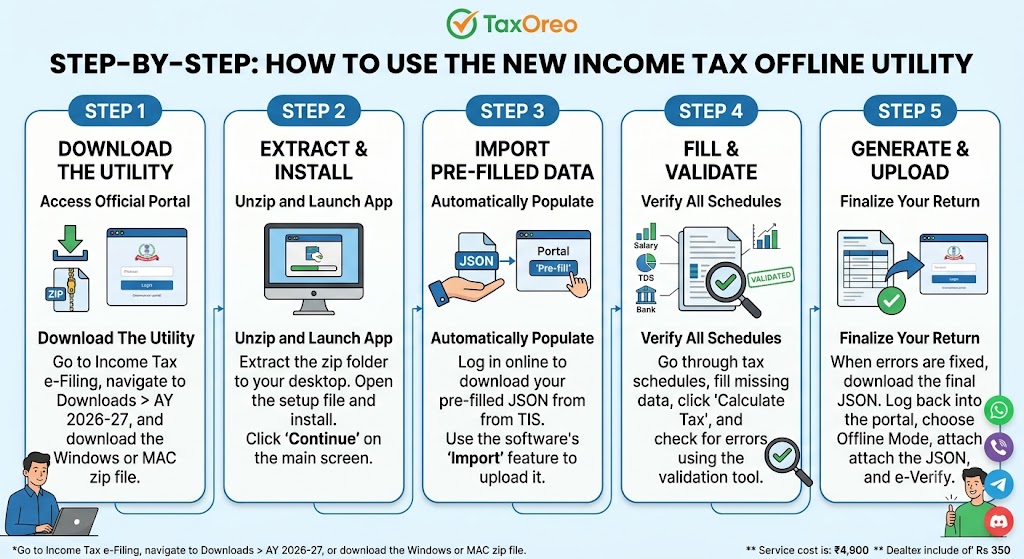
Step-by-Step: How to Use the New Offline Utility
To help your website visitors navigate the process easily, you can share this simple step-by-step workflow:
1.Download the Utility:
Step 1.Go to the official Income Tax e-Filing portal. Navigate to Downloads > Income Tax Returns and choose the Assessment Year 2026-27. Download the ZIP file for either Windows or MAC.
2.Extract and Install:
Step 2.Extract (unzip) the downloaded folder on your desktop. Open the setup file to install and launch the application. Click Continue on the home screen.
3.Import Pre-Filled Data:
Step 3.Log into your online e-filing profile, go to e-File > Income Tax Return > Download Pre-filled Data, and grab your personal JSON file. In the offline software, click File Returns > Import Pre-filled Data and upload this file to automatically populate your salary, TDS, and bank details.
4.Fill and Validate:
Step 4.Navigate through the tax schedules and fill out any remaining data. Click Calculate Tax and then click Proceed to Validation. The utility will instantly point out any errors or missing information so you can fix them.5.Generate JSON and Upload:
Step 5.Once validation shows zero errors, click Download JSON. Log back into the e-filing portal, select Offline Mode for filing, attach this final JSON file, and e-verify your return using Aadhaar OTP or Net Banking.